Showing posts with label .Net Core. Show all posts

Wednesday, 7 September 2016

Hello ASP.Net Core/.Net Core (Part 3 )


Asp.Net Core applications are self-hosted. The Host process in which it will be executed needs to  implement the IWebHost interface.


This Host process /  IWebHost implementation is in charge of Application Startup as well as it's Lifecycle. The Host process has to be configured


  • to use a particular HTTP Server which will handle the Request. 

  • to use certain Middleware components for the Application Request-Response Pipeline. 

  • to create the Services that will be needed by Application. 

  • In the ASP.Net Core MVC Project Template, the Program.cs file comes with the following code which builds and launches the Host / IWebHost.


    The IWebHost can be launched 

    • in a blocking manner by calling the Run() method.
    • in a non-blocking manner by calling the Start() method. 

    HTTP Server  

    The Host process can use one of the following 2 HTTP Servers

    • Kestrel (Cross Platform)
    • WebListener (Windows Only)
    This HTTP Server listens to the request and forwards it to our ASP.Net Core Application for execution.

    In Production, these HTTP servers should not be external facing. They should be behind a Proxy/Reverse Proxy like IIS on Windows, Apache on Linux etc which will forward the request to it. 

    (IIS has an ASP.Net Core Module which forwards the request to the HTTP Server being used by Host of our ASP.Net Core application) 

    In the above code, the UseKestrel() method indicates the the Host process will use Kestrel as the HTTP Server. The UseIISIntegration() method indicates that IIS will be used as Reverse Proxy. 

    Configuring Middleware 

    The IWebHost can be configured by providing a Configure() method, or specifying a Startup class which will have the method. 

    The Configure() method is used to add Middleware components to the Application Request-Response Pipeline. Think of Middleware components as the lightweight .Net Core versions of .Net Framework's  HttpModules. These Middleware Components perform certain actions on the incoming request and then pass it onto the next Middleware Component. Or they may handle the Incoming Request themselves and create and send back the Response instead of passing it on to the next Middleware Component. 

    In the ASP.Net Core MVC Project Template, the Startup.cs file comes with the following code in the Configure() methods adding some of the Middleware Components by default. 


    Configuring Services 

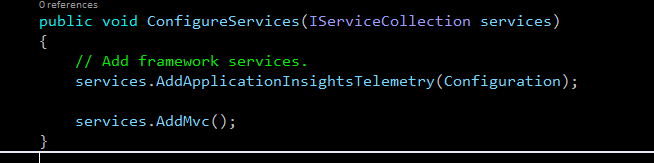
    The IWebHost Services can be configured by providing a  ConfigureServices() method, or specifying a Startup class which will have the method. 

    In the ASP.Net Core MVC Project Template, the Startup.cs file comes with the following code in the ConfigureServices() methods adding some of the Services by default. 


    Tuesday, 30 August 2016

    Hello ASP.Net Core/ .Net Core (Part 2 )


    This is one in a series of posts about ASP.Net Core/.Net Core.

    .Net Core CLI

    .Net Core comes with a Command Line Interface, .Net Core CLI. We can run our ASP.Net Core application using this .Net Core CLI. If we navigate to our ASP.Net Core Application folder, and then run the command dotntet run , the .Net Core CLI will launch our ASP.Net Core Application.


    We no longer need IIS or Visual Studio to run out Web Application.


    In Addition to running our Application, .Net Core CLI can also build our application or get the NuGet packages.


    This frees us from having to use Visual Studio IDE to build and debug our Web Application. We could use the free Visual Studio Code or any other text editor. The CLI commands can then be used for everything else. 

    Hello ASP.Net Core/ .Net Core (Part 1 )


    ASP.Net Core and .Net Core was released with much fanfare by Microsoft a few weeks ago. It has been described by Microsoft as  ".NET Core is a cross-platform, open source, and modular .NET platform for creating modern web apps, microservices, libraries and console applications." 

    So, why did Microsoft have to come up with .Net Core/ ASP.Net Core ? What is different about it compared to .Net Framework? Why should we use it?

    I'm going to write a few blogs articles discussing these and my thoughts about it. (I'm not going to be doing any tutorials on how to build applications using ASP.Net Core.).

    Monolithic ASP.Net vs Modular ASP.Net Core


    For ASP.Net, the Windows Server had to have .Net Framework, which consists of the Conmmon Language Runtime and Framework Class Libraries, as well as IIS installed. After that, one's ASP.Net application could run on the machine.

    For ASP.Net Core, the various libraries are implemented separately rather than one big monolithic Framework and are made available as NuGet Modules. We individually select which Asp.Net Libraries we want and add them to our ASP.Net Core project.

    This makes ASP.Net Core lack the simplicity of the ASP.Net but it provides a lot more flexibility. The various ASP.Net Core modules are developed by different teams and new versions of different modules could be released quite frequently, bug fixes could be released quite frequently and we could selectively upgrade just that particular library. Previously we had to wait for the next version of .Net Framework, e.g. .Net 4.5 or .Net 4.6 to come out. Also, when we upgraded to the new version, all of the libraries would get upgraded and not just the library we wanted.

    This also gives ASP.Net Core applications a much smaller footprint as only the libraries we need are there rather than the whole huge .Net Framework.


    Decoupled from IIS 


    System.Web.dll is dead. It is no longer present in ASP.Net Core. This is actually a pretty big deal.

    System.Web.dll was, in many ways, the heart of ASP.Net. It contained the class System.Web.HttpApplication (made available in the ASP.Net project via Gloabal.asax and Global.asax.cs) which represented the ASP.Net Application and it's Request-Response pipeline. This had a a collection of built-in Pipeline components(Http Modules) such as, Authentication/Authorization/Session etc. which used to inspect and the incoming request/outgoing response and modify it. Additionally, this was heavily coupled together with IIS 7 +.

    In ASP.Net Core, we no longer have System.Web.dll or the System.Web.HttpApplication Class or other related classes. Consequently, we no longer need IIS for ASP.Net Core Applications. It can be self-hosted.

    Also, we no longer have the Request-Response Pipeline that came with System.Web.HttpApplication, which many ppl thought had got too bloated with a lot of Http Modules and wasn't very efficient.

    So, if there is no IIS or built in Request-Response Pipeline, how does ASP.Net Core process requests ?

    Simple, we build our own Application Request-Response pipeline.  ASP.Net Core project have a Program.cs with a Main(), which is the entry point. In this, we use the WebHostBuilder class to configure and build an instance of  WebHost and then run it. This WebHost instance will then take care of handling and executing all requests.

    When building the WebHost instance, we select what goes in our pipepline, such as modules for  MVC, Static Files, Authentication etc.


    Cross Platform vs Windows Only 


    Microsoft .Net Framework consists of a Runtime called  CLR and Libraries called FCL/Framework Class Library. Some of the libraries written in FCL specifically targetted the Windows Operating System. The CLR can also only run on Windows. So, with .Net Framework, we are pretty much tied to the Windows OS.

    For .Net Core, Microsoft wrote a new Runtime called CoreCLR which can run on Linux, Windows, Mac OS X. The libraries for .Net Core called CoreFX, also don't have any Windows Specific dependency, making .Net Core/ ASP.Net Core truly multi-platform.